RAID Data Recovery Services
Expert, professional RAID data recovery for all failed arrays (RAID 0, 1, 5, 6, 10, 50, 60, JBOD). Fast, secure, and certified enterprise recovery with a 99% success rate.




RAID DATA RECOVERY SERVICES
At Data Recovery SOS, we provide industry-leading RAID data recovery services for businesses, databases, data centers, and enterprise network setups. A failed or degraded RAID array can completely halt your business operations, causing costly downtime and critical data loss. Our highly specialized engineers possess the deep-level technical expertise and proprietary tools required to handle the most complex RAID data recovery situations.
Emergency RAID Data Recovery & Server Array Repair
We operate a 24/7 emergency response hotline and offer specialized onsite RAID data recovery services. Our engineers can arrive at your facility with advanced portable cloning systems to reconstruct Stripe configurations, map parity rotation, and bypass controller blocks directly in your server room.
Comprehensive RAID Data Recovery Capabilities
We handle all RAID levels, configurations, and network environments. Our engineers are capable of recovering data from arrays with multiple failed disks, corrupt partition tables, and controller malfunctions. We support:
RAID 0 Recovery
Striped array configuration with zero parity redundancy. A single disk fault severs logical block addressing. Our lab reconstructs raw sectors and manually realigns stripe blocks.
RAID 1 Recovery
Mirrored storage layouts. We recover degraded, out-of-sync, or completely offline RAID 1 arrays, stabilizing individual physical drives to restore system state.
RAID 5 Recovery
Distributed block-level parity with 1-drive tolerance. We safely reconstruct the missing stripes when multiple disks degrade by evaluating array geometry on the fly.
RAID 6 Recovery
Dual distributed parity providing 2-drive fault tolerance. Our cleanroom specialists reconstruct files when 3 or more drives have failed physically or logically.
RAID 10 Recovery
Stripe of mirrors (1+0). We locate corrupt mirror segments, bypassing hardware failures to realign block sets without needing the physical host controller.
RAID 50 / 60 Recovery
Multi-level nested layouts. We reverse-engineer parity cycles, rotation offsets, and block-level striping maps across complex virtual and physical enclosures.
NAS & SAN Systems
Certified recovery for Synology (SHR), QNAP, Drobo, and Dell. We decode proprietary file systems (EXT4, Btrfs, ZFS) to restore lost shared folders.
Virtual Environments
Retrieval for VMware ESXi VMDK, Hyper-V VHDX, and virtual machine disks. We extract files directly from within corrupted virtual block systems.
Certified Cleanroom and Lab Security
If any of the constituent drives in your array have suffered physical mechanical failure (such as clicking sounds, spindle seize, or read/write head crashes), we repair them inside our certified ISO Class 100 Cleanroom environment. Our internal systems are completely air-gapped and physically isolated from the internet to ensure full compliance with strict privacy standards (HIPAA, PCI-DSS, SOC 2). We sign formal NDAs to protect your organization's intellectual property.
⚠️ CRITICAL WARNING FOR RAID SYSTEM ADMINISTRATORS:
If your RAID array goes offline or is marked as degraded, DO NOT attempt to perform a hard rebuild or force a drive online if you hear physical clicking or scratch noises, or if you are not 100% sure of the exact sequence of drive failures. Doing so can cause immediate overwrite and irreversible sector corruption, rendering future RAID data recovery attempts impossible.
SPECIALIZED RECOVERY SERVICES
RAID 0 Recovery Service
A RAID 0 array is a set of drives (minimum of 2) where data is stored in a series of stripes. Striping is where fragments of the aggregated data are written sequentially across each disk in the set. The fragments of data are then simultaneously written and read from the set of disks but treated as a unified system. Because fragments of data can be retrieved from multiple disks simultaneously, a set of RAID 0 drives have a higher performance rate and more access to usable storage compared to a single disk drive.
However, RAID 0 arrays are without parity, or redundancy. This means that the fragments of data stored on each disk are only on that specific disk and not repeated anywhere else in the array. When one sector on one of the disks fails, however, the corresponding sector on every other disk is rendered useless because part of the data is now corrupted.
Specialized Server Data Recovery Services
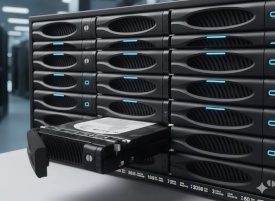





Onsite RAID Recovery
For mission-critical enterprise environments where data cannot leave the premises, we offer specialized onsite RAID recovery services. Our engineers will travel to your location with portable lab equipment to perform emergency reconstruction and data extraction.
Common Symptoms of RAID Failure
Critical Warning Signs
Array shows “Degraded” or “Failed” status in management console
Multiple disks missing, unassigned, or reported as “Foreign”
Rebuild starts then fails or hangs for hours
Volumes mount read‑only, appear as RAW, or request formatting
Controller errors, sudden power loss or firmware updates preceding failure
Unusual clicking/beeping from disks, or extreme slowdown when accessing files
IF YOU OBSERVE ANY OF THESE, POWER DOWN AND CONTACT OUR TEAM. ATTEMPTING REBUILDS CAN WORSEN DATA LOSS.
What To Do
Stop immediately
Power down the system or stop using it to prevent data overwrites.
Label drives
Clearly label drives with their original position before touching them.
Check connections
Ensure all cables are secure; a loose cable can mimic a drive failure.
Monitor health
Use built-in tools to check individual drive health and array status.
Keep backups
Have current, offsite backups as RAID is not a backup itself.
Consult experts
For complex failures (multiple drives, controller issues), contact data recovery specialists.
What Not To Do
Do not Re-initialize RAID System
Never attempt to re-initialize the array as this can permanently destroy data structures.
Don't panic or DIY complex fixes
Avoid amateur attempts, especially if more than one drive fails. DIY can lead to permanent loss.
Don't rebuild immediately
Don't start a rebuild if the issue isn't fully understood, as it can overwrite good data.
Don't run disk utilities
Avoid tools like CHKDSK or initialization/formatting; they can destroy recovery data.
Don't swap drives randomly
Drive order is critical; incorrect placement can cause total failure.
Don't write data
Avoid installing software or saving files to the array.
Don't assume
A failed drive doesn't always mean total data loss (e.g., in RAID 5), but it requires careful handling.
Enterprise RAID 6 Array Recovery - 24TB
The Problem
"A large financial services firm experienced a catastrophic failure of their primary file server. The server used a RAID 6 configuration with 12 drives. Three drives failed within a 48-hour period, exceeding the array's fault tolerance and rendering the 24TB volume inaccessible."
The Solution
Our engineers performed physical repairs on two of the three failed drives in our Class 100 Clean room environment. Once the drives were stabilized, we created bit-level clones of all 12 drives. Using our proprietary RAID reconstruction software, we virtually reassembled the array, accounting for the specific parity rotation and stripe size used by the proprietary controller.

The Result
We achieved a 99.9% data recovery rate, restoring all critical financial databases and client records. The entire process was completed within 72 hours, minimizing the firm's downtime and preventing significant financial loss.
Our Server Data Recovery Process
Phase 1: Initial Assessment
Step 01Our engineers perform a non-destructive evaluation of all server components, including the RAID controller, backplane, and individual media. We analyze the metadata, parity consistency, and file system structures to determine the exact sequence of failure and the most effective path to recovery.
Phase 2: Drive Imaging
Step 02Using advanced hardware imagers like PC-3000 SAS/SATA, we create bit-for-bit clones of every drive in the array. We handle drives with physical damage, bad sectors, or firmware issues in our Class 100 Clean room environment, ensuring we have a 100% safe working copy before any reconstruction begins.
Phase 3: RAID Reconstruction
Step 03We virtually reassemble the array by determining critical parameters such as stripe size, parity rotation, block offset, and drive order. This process bypasses failed controllers and allows us to rebuild the logical volumes even when multiple drives have failed or the configuration has been lost.
Phase 4: Data Validation
Step 04Once the RAID is reconstructed, we perform deep logical repairs on the file system (NTFS, ReFS, EXT4, XFS, VMFS). We verify the integrity of critical databases (SQL, Exchange, Oracle) and virtual machines, providing you with a comprehensive file list and integrity report for your approval.
Service Level Options
Standard
5-7 Days
Non-critical needs
Priority
2-4 Days
Expedited service
Weekend
1-3 Days
Sat & Sun service
Emergency
24/7/365
Immediate start
Ready to Recover Your Valuable Data?
Don't let data loss hold you back. Contact our experts today for a free, no-obligation evaluation. With our No Data, No Fee guarantee, you have nothing to lose and everything to gain.
GET YOUR FREE EVALUATION
No Obligation, No upfront cost, 100% Confidential
Need Help Now?
Our data recovery engineers are standing by 24/7 to help you recover your critical data.
1-877-977-3577