Server Data Recovery
Professional, high-relevance Server Data recovery services for all physical, virtual, and cloud servers. Expert emergency server retrieval with a 99% recovery rate.





SERVER DATA RECOVERY SERVICES
At Data Recovery SOS, we specialize in expert, high-relevance Server Data recovery solutions designed to restore enterprise environments quickly and securely. When a database server, mail server, file server, or application controller crashes, the financial impact on your organization mounts with every passing minute. Our dedicated enterprise engineering team stands ready 24/7 to perform comprehensive Server Data recovery from any storage hardware or operating system.
Immediate Onsite Server Data Recovery
We provide fast, nationwide onsite response for critical server downtime. Our engineers will arrive at your facility or data center to handle hardware stabilization, storage array rebuilding, and partition repair. If your physical drives require mechanical cleanroom repair, we can extract them and transport them to our local high-security laboratories. Learn more about our onsite Server Data recovery services.
Comprehensive Server Platforms and Operating Systems
Our certified engineers have extensive experience with all major server brands, virtualization platforms, and operating systems. We perform professional Server Data recovery from:
Dell PowerEdge
All generations and PERC RAID controllers. We support hardware rebuilding, physical disk hot-swaps, and corruption of virtual disk headers on PERC hardware.
HP ProLiant & BladeSystem
Smart Array hardware configurations, SAS expansion shelves, and HP SmartStorage architectures. We reconstruct data directly bypassing failed controllers.
IBM & Lenovo System x
Support for Flex System and ThinkSystem architectures, including ServeRAID controllers, physical SAS/SATA drives, and enterprise SAN storage cabinets.
Windows Server
Full support for Active Directory directory structures, NTFS, ReFS volume structures, and Microsoft Storage Spaces parity arrays.
Linux Servers
Expert alignment for RedHat, Ubuntu, CentOS, Debian, and SUSE. We restore lost data from Ext4, XFS, Btrfs, and logical volume structures (LVM).
Unix Variants
In-depth recovery for Solaris ZFS storage pools, IBM AIX systems, FreeBSD, HP-UX, and various custom Unix kernels.
Virtualization Environments
Extraction from VMware ESXi VMDK files, Microsoft Hyper-V VHD/VHDX networks, Citrix Hypervisor, and Proxmox cluster nodes.
SQL & Databases
Recovery of raw database blocks from Microsoft SQL Server (MDF/LDF), Oracle DB, Exchange Server EDB mailstores, and PostgreSQL clusters.
Security, NDA, and Compliance Standards
Server drives contain your most sensitive business data, database tables, financial records, and user credentials. To guarantee maximum protection, our server recovery laboratories feature biometric physical controls, round-the-clock high-definition CCTV coverage, and strict air-gapped forensic networks. No data ever leaves our certified facilities. We comply fully with HIPAA, PCI-DSS, and SOC 2 standards and routinely sign formal NDAs.
⚠️ SERVER CRASH SAFETY PROTOCOL:
In the event of a system crash, operating system error, or failure to mount partitions, DO NOT run utility scripts like chkdsk or fsck -y on degraded volumes. These tools are designed to force consistency by deleting damaged files and folders, which can lead to catastrophic data loss. Power down the system immediately to preserve disk states.
Specialized Server Data Recovery Services




Onsite Server Data Recovery
We provide immediate onsite response for failed servers, including Dell PowerEdge, HP ProLiant, and IBM systems. Our onsite team handles hardware stabilization, RAID reconstruction, and logical file system repair directly in your data center to minimize downtime.
Common Symptoms of RAID Failure
Critical Warning Signs
Array shows “Degraded” or “Failed” status in management console
Multiple disks missing, unassigned, or reported as “Foreign”
Rebuild starts then fails or hangs for hours
Volumes mount read‑only, appear as RAW, or request formatting
Controller errors, sudden power loss or firmware updates preceding failure
Unusual clicking/beeping from disks, or extreme slowdown when accessing files
IF YOU OBSERVE ANY OF THESE, POWER DOWN AND CONTACT OUR TEAM. ATTEMPTING REBUILDS CAN WORSEN DATA LOSS.
What To Do
Stop immediately
Power down the system or stop using it to prevent data overwrites.
Label drives
Clearly label drives with their original position before touching them.
Check connections
Ensure all cables are secure; a loose cable can mimic a drive failure.
Monitor health
Use built-in tools to check individual drive health and array status.
Keep backups
Have current, offsite backups as RAID is not a backup itself.
Consult experts
For complex failures (multiple drives, controller issues), contact data recovery specialists.
What Not To Do
Do not Re-initialize RAID System
Never attempt to re-initialize the array as this can permanently destroy data structures.
Don't panic or DIY complex fixes
Avoid amateur attempts, especially if more than one drive fails. DIY can lead to permanent loss.
Don't rebuild immediately
Don't start a rebuild if the issue isn't fully understood, as it can overwrite good data.
Don't run disk utilities
Avoid tools like CHKDSK or initialization/formatting; they can destroy recovery data.
Don't swap drives randomly
Drive order is critical; incorrect placement can cause total failure.
Don't write data
Avoid installing software or saving files to the array.
Don't assume
A failed drive doesn't always mean total data loss (e.g., in RAID 5), but it requires careful handling.
Enterprise SQL Server Database Recovery - 4TB
The Problem
"A manufacturing company's primary SQL database server suffered a dual-drive failure in a RAID 5 configuration. The database became corrupted, and the backup system had failed to run for the previous two weeks, leaving the company at risk of losing critical production data."
The Solution
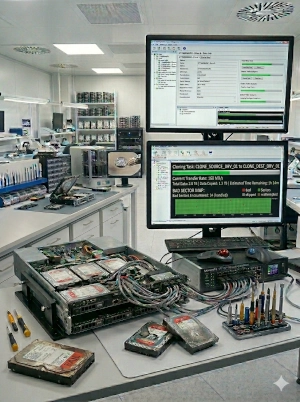
Our team performed a bit-level clone of the remaining healthy drives and used advanced forensic tools to reconstruct the missing data from the two failed disks. We manually repaired the SQL database's internal structures and restored the primary MDF and LDF files.
The Result
100% of the SQL database was recovered and verified for integrity. The company was back in production within 36 hours, avoiding an estimated $200,000 in lost revenue.
Our Server Data Recovery Process
Phase 1: Initial Assessment
Step 01Our engineers perform a non-destructive evaluation of all server components, including the RAID controller, backplane, and individual media. We analyze the metadata, parity consistency, and file system structures to determine the exact sequence of failure and the most effective path to recovery.
Phase 2: Drive Imaging
Step 02Using advanced hardware imagers like PC-3000 SAS/SATA, we create bit-for-bit clones of every drive in the array. We handle drives with physical damage, bad sectors, or firmware issues in our Class 100 Clean room environment, ensuring we have a 100% safe working copy before any reconstruction begins.
Phase 3: RAID Reconstruction
Step 03We virtually reassemble the array by determining critical parameters such as stripe size, parity rotation, block offset, and drive order. This process bypasses failed controllers and allows us to rebuild the logical volumes even when multiple drives have failed or the configuration has been lost.
Phase 4: Data Validation
Step 04Once the RAID is reconstructed, we perform deep logical repairs on the file system (NTFS, ReFS, EXT4, XFS, VMFS). We verify the integrity of critical databases (SQL, Exchange, Oracle) and virtual machines, providing you with a comprehensive file list and integrity report for your approval.
Service Level Options
Standard
5-7 Days
Non-critical needs
Priority
2-4 Days
Expedited service
Weekend
1-3 Days
Sat & Sun service
Emergency
24/7/365
Immediate start
Ready to Recover Your Valuable Data?
Don't let data loss hold you back. Contact our experts today for a free, no-obligation evaluation. With our No Data, No Fee guarantee, you have nothing to lose and everything to gain.
GET YOUR FREE EVALUATION
No Obligation, No upfront cost, 100% Confidential
Need Help Now?
Our data recovery engineers are standing by 24/7 to help you recover your critical data.
1-877-977-3577